A monthly task is due on January 31. That date falls on Sunday, and Monday is a closure. Moving this deadline to Tuesday makes sense. Making Tuesday the anchor for every future month changes the schedule.
The solution is to keep two values: the scheduled date and the adjusted deadline. This article follows that separation in Filesoft Adjusted Recurring Dates 0.1.0, an editable teaching file with 22 examples.
1. Keep the schedule and deadline separate.
Example 02 uses January 31, 2027 as its calendar anchor, with a one-month interval and occurrence 0. Zero means the anchor itself; the next two rows show occurrences 1 and 2. February 1 is entered as a fictional closure.
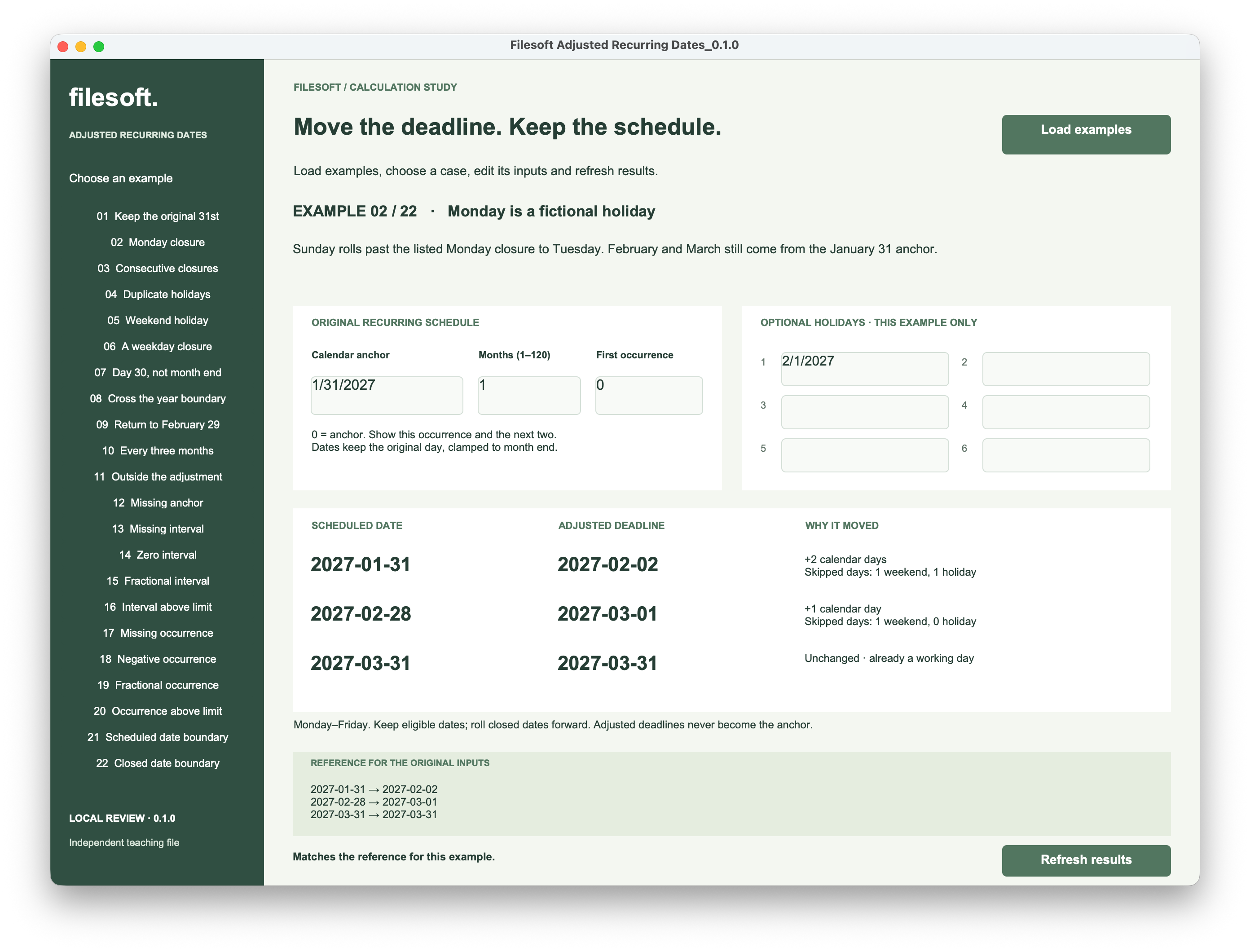
| Occurrence | Scheduled date | Adjusted deadline | Reason |
|---|---|---|---|
| 0 | January 31, 2027 | February 2, 2027 | Sunday and the listed Monday closure are skipped. |
| 1 | February 28, 2027 | March 1, 2027 | The scheduled Sunday moves to Monday. |
| 2 | March 31, 2027 | March 31, 2027 | Wednesday is already eligible. |
Each scheduled date comes directly from the original anchor and occurrence number. February uses its last valid day, then March returns to the 31st. Neither February 2 nor March 1 becomes a new anchor.
This file preserves the original day of the month, clamping it when necessary. It does not turn every anchor into a “last day of the month” rule: an April 30 anchor leads to May 30, before any working-day adjustment.
2. Move past a closure once.
The working week in this example is Monday to Friday. A scheduled weekday stays unchanged unless it appears in one of the six holiday fields. A closed date moves forward one day at a time until an eligible date is found.
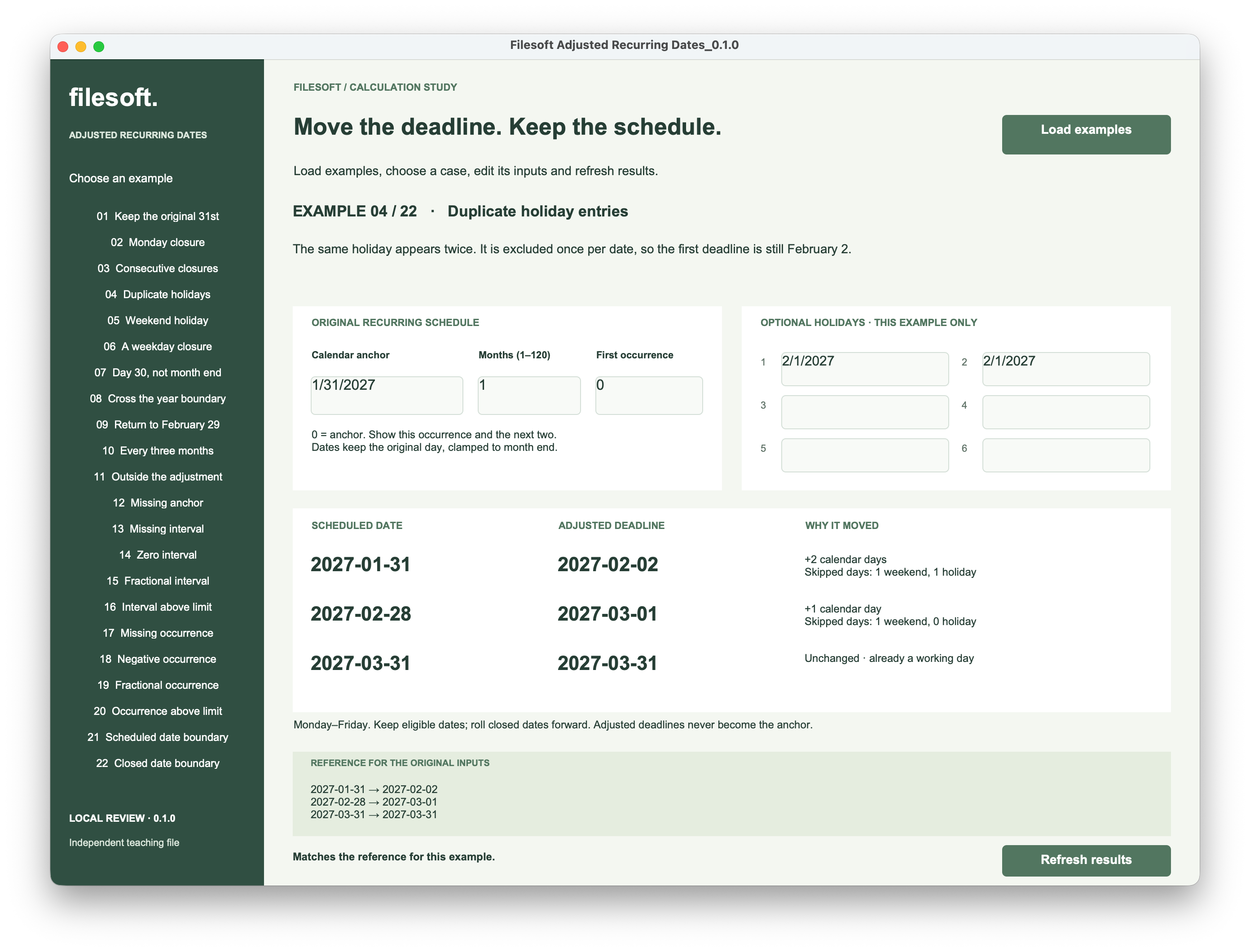
Example 04 lists February 1 twice. The calculation asks whether the date is in the holiday list; it does not add a delay for each matching entry. The deadline is still February 2.
A weekend holiday is already closed and does not create an extra exclusion or a substitute Monday. Enter an observed holiday explicitly. Entries are exact dates for the selected example, with no automatic annual repetition or downloaded national calendar.
Adding a February 2 closure would move the first deadline to February 3. It would leave the scheduled dates, and the unaffected later deadlines, alone.
3. Preserve the leap-day anchor.
Example 09 starts with February 29, 2028, a 12-month interval and first occurrence 3. The displayed schedule is February 28, 2031; February 29, 2032; and February 28, 2033.
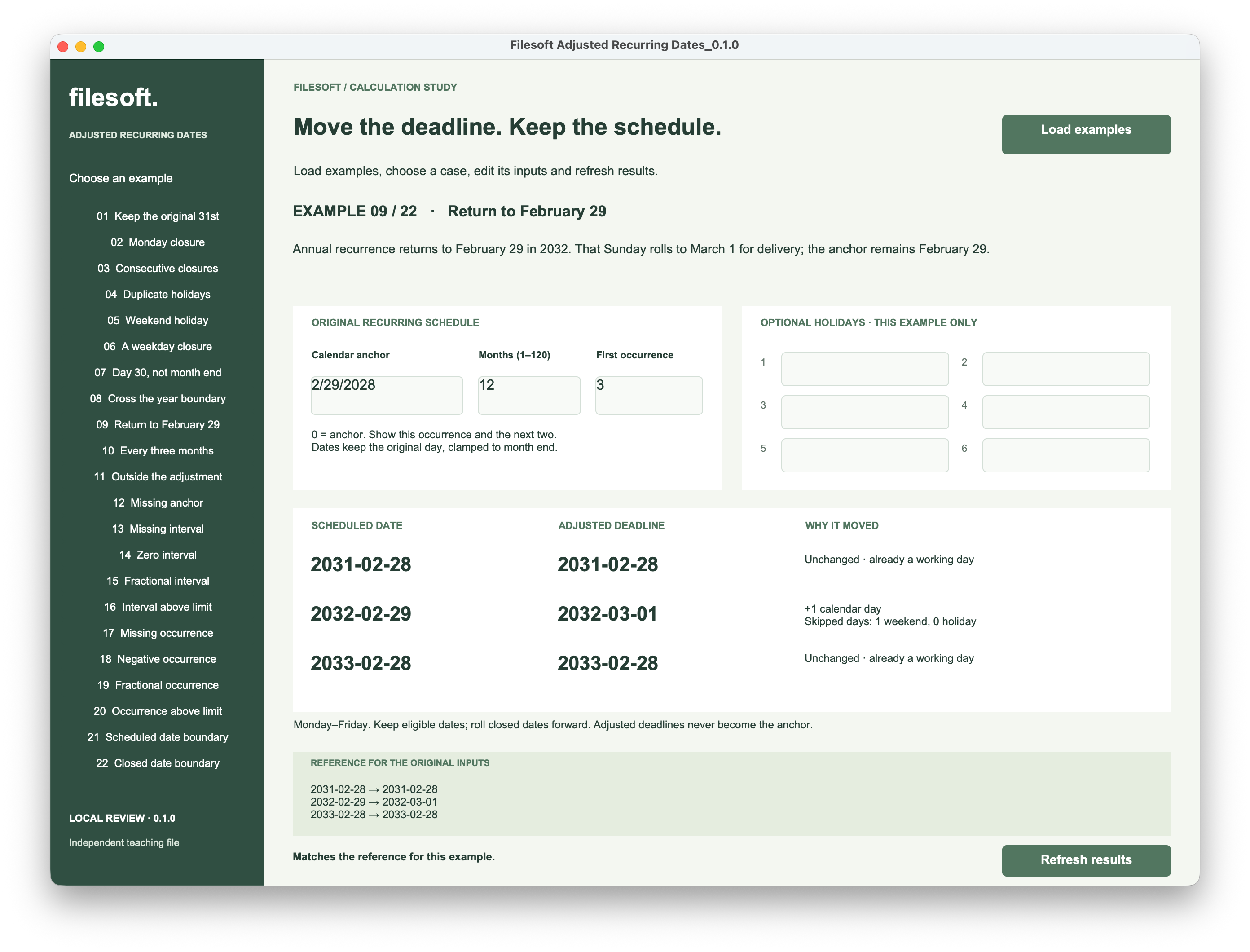
February 29, 2032 is a Sunday, so its working deadline becomes March 1. The next annual occurrence still comes from the February 29 anchor. Calculating from the adjusted March 1 deadline would lose that rule.
4. Calculate the schedule first, then adjust each date.
These are calculation-field expressions from the example, with their documentation headers omitted. They depend on the named fields; they are not one standalone formula. AnchorDate and Holiday1 through Holiday6 are Date fields. IntervalMonths and Occurrence are Number fields.
The calculations below cover the first row. MonthIndex1 returns Number; ScheduledDate1 and AdjustedDate1 return Date. The other helpers return Text.
Start with the input validation and holiday helpers
InputIssue returns empty text only for accepted inputs: whole months from 1 to 120, first occurrence from 0 to 1200, a valid anchor and valid nonblank holiday dates. Blank inputs are not silently replaced with defaults.
FileMaker calculation · InputIssue
Case (
    IsEmpty ( AnchorDate ) ; "Enter a calendar anchor." ;
    not IsValid ( AnchorDate ) ; "Enter a valid calendar anchor." ;
    IsEmpty ( IntervalMonths ) ; "Enter the interval in months." ;
    not IsValid ( IntervalMonths ) or IntervalMonths < 1 or IntervalMonths > 120 or Int ( IntervalMonths ) <> IntervalMonths or Filter ( GetAsText ( IntervalMonths ) ; "0123456789" ) <> GetAsText ( IntervalMonths ) ; "Use whole months from 1 to 120." ;
    IsEmpty ( Occurrence ) ; "Enter the first occurrence." ;
    not IsValid ( Occurrence ) or Occurrence < 0 or Occurrence > 1200 or Int ( Occurrence ) <> Occurrence or Filter ( GetAsText ( Occurrence ) ; "0123456789" ) <> GetAsText ( Occurrence ) ; "Use an occurrence from 0 to 1200." ;
    ( not IsEmpty ( Holiday1 ) and not IsValid ( Holiday1 ) ) or ( not IsEmpty ( Holiday2 ) and not IsValid ( Holiday2 ) ) or ( not IsEmpty ( Holiday3 ) and not IsValid ( Holiday3 ) ) or ( not IsEmpty ( Holiday4 ) and not IsValid ( Holiday4 ) ) or ( not IsEmpty ( Holiday5 ) and not IsValid ( Holiday5 ) ) or ( not IsEmpty ( Holiday6 ) and not IsValid ( Holiday6 ) ) ; "Correct the invalid holiday date." ;
    ""
)
HolidayNumbers creates a return-separated list of numeric date values, avoiding comparisons between differently formatted date strings. Blank holiday slots are ignored.
FileMaker calculation · HolidayNumbers
List ( Case ( IsEmpty ( Holiday1 ) ; "" ; GetAsNumber ( Holiday1 ) ) ; Case ( IsEmpty ( Holiday2 ) ; "" ; GetAsNumber ( Holiday2 ) ) ; Case ( IsEmpty ( Holiday3 ) ; "" ; GetAsNumber ( Holiday3 ) ) ; Case ( IsEmpty ( Holiday4 ) ; "" ; GetAsNumber ( Holiday4 ) ) ; Case ( IsEmpty ( Holiday5 ) ; "" ; GetAsNumber ( Holiday5 ) ) ; Case ( IsEmpty ( Holiday6 ) ; "" ; GetAsNumber ( Holiday6 ) ) )FilterValues checks membership in this list. Testing its result with not IsEmpty makes duplicate matches a single yes/no decision. See the Claris FilterValues reference.
Derive the target month from the anchor.
A zero-based month index makes crossing years straightforward. Add the occurrence number multiplied by the interval to the anchor’s month index.
FileMaker calculation · MonthIndex1
Case ( IsEmpty ( InputIssue ) ; ( Year ( AnchorDate ) - 1 ) * 12 + Month ( AnchorDate ) - 1 + ( Occurrence + 0 ) * IntervalMonths ; "" )FileMaker calculation · ScheduleIssue1
Case ( not IsEmpty ( InputIssue ) ; InputIssue ; MonthIndex1 > 47999 ; "Scheduled date exceeds year 4000." ; "" )Index 47999 is December of year 4000. The guard stops an out-of-range scheduled occurrence before trying to construct its date.
FileMaker calculation · ScheduledDate1
Case ( IsEmpty ( ScheduleIssue1 ) ;
    Let ( [ y = Div ( MonthIndex1 ; 12 ) + 1 ; m = Mod ( MonthIndex1 ; 12 ) + 1 ;
        lastDay = Case ( m = 12 ; 31 ; Day ( Date ( m + 1 ; 0 ; y ) ) ) ] ;
        Date ( m ; Min ( Day ( AnchorDate ) ; lastDay ) ; y )
    ) ; ""
)
The target year and month come from that index. Min keeps the anchor’s day when possible and uses the target month’s last day when necessary. December uses 31 directly, avoiding a calculation that would step into year 4001 to find its month end.
Rows two and three use occurrence offsets 1 and 2 in their own month-index calculations. All three use AnchorDate; no row reads an earlier adjusted deadline.
Inspect the scheduled date before moving it.
AdjustmentJSON1 begins at the scheduled date. Unlike counting a positive number of working days after a start, adjustment must keep an already eligible date. The loop runs only while its current date is closed.
FileMaker calculation · AdjustmentJSON1
Case ( not IsEmpty ( ScheduleIssue1 ) ; "" ;
    While ( [
        d = GetAsNumber ( ScheduledDate1 ) ; shifted = 0 ; weekends = 0 ; closures = 0 ;
        ceiling = GetAsNumber ( Date ( 12 ; 31 ; 4000 ) ) ;
        closed = DayOfWeek ( d ) = 1 or DayOfWeek ( d ) = 7 or not IsEmpty ( FilterValues ( HolidayNumbers ; GetAsText ( d ) ) )
    ] ; closed and d < ceiling and shifted < 31 ; [
        weekends = weekends + Case ( DayOfWeek ( d ) = 1 or DayOfWeek ( d ) = 7 ; 1 ; 0 ) ;
        closures = closures + Case ( DayOfWeek ( d ) <> 1 and DayOfWeek ( d ) <> 7 and not IsEmpty ( FilterValues ( HolidayNumbers ; GetAsText ( d ) ) ) ; 1 ; 0 ) ;
        d = d + 1 ; shifted = shifted + 1 ;
        closed = DayOfWeek ( d ) = 1 or DayOfWeek ( d ) = 7 or not IsEmpty ( FilterValues ( HolidayNumbers ; GetAsText ( d ) ) )
    ] ; JSONSetElement ( "{}" ;
        [ "date" ; d ; JSONNumber ] ;
        [ "shift" ; shifted ; JSONNumber ] ;
        [ "weekends" ; weekends ; JSONNumber ] ;
        [ "holidays" ; closures ; JSONNumber ] ;
        [ "issue" ; Case ( closed and d = ceiling ; "No working date before year 4001." ; closed ; "No working date within the 31-day search." ; "" ) ; JSONString ]
    ) )
)
DayOfWeek identifies Sunday as 1 and Saturday as 7. Each iteration counts the current closed date, advances by one calendar day, then checks the new date. Weekday holidays and weekend days have separate totals. See the DayOfWeek reference and While reference for FileMaker’s evaluation rules.
The JSON carries the candidate date, number of shifted days, excluded-day counts and an issue. The search stops at the supported date ceiling or a 31-day safety limit. A candidate is not a successful deadline when the issue is nonempty.
Keep failure separate from a usable date.
FileMaker calculation · AdjustmentIssue1
Case ( not IsEmpty ( ScheduleIssue1 ) ; ScheduleIssue1 ; JSONGetElement ( AdjustmentJSON1 ; "issue" ) )FileMaker calculation · AdjustedDate1
Case ( IsEmpty ( AdjustmentIssue1 ) ; GetAsDate ( JSONGetElement ( AdjustmentJSON1 ; "date" ) ) ; "" )AdjustmentIssue1 carries either the scheduling error or adjustment error. AdjustedDate1 returns an empty date when an issue exists. Show the explanation beside it, rather than saving the final candidate as if the search succeeded.
5. Stop at the supported date boundary.
FileMaker supports years 0001 through 4000. Example 21 makes two different failures visible: a scheduled date can be valid with no supported working deadline, or the scheduled occurrence itself can fall outside the range. See the Claris Date reference.
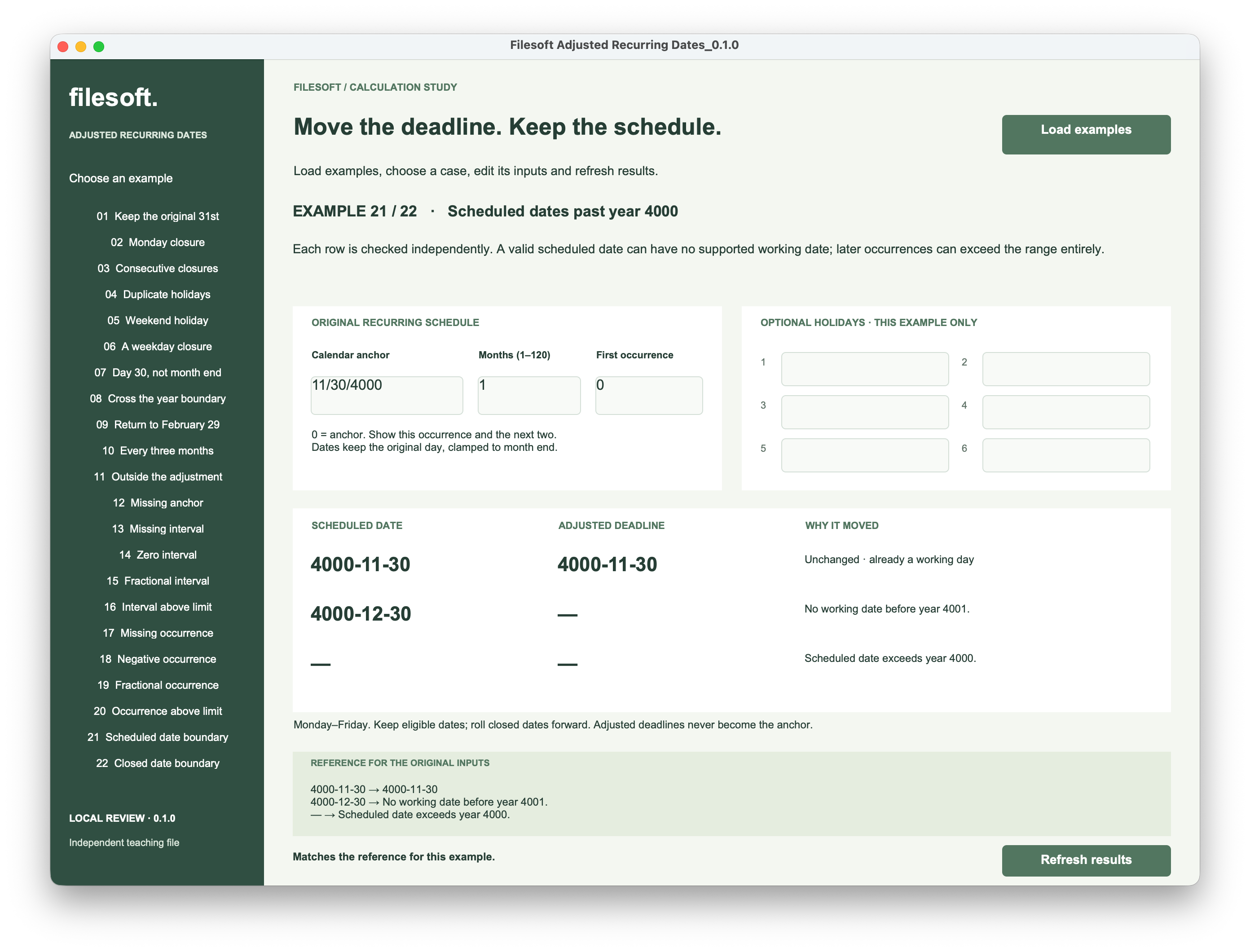
November 30, 4000 is an eligible Thursday. December 30 is a Saturday, and the following Sunday is the last supported date. There is no supported Monday to return. The third monthly occurrence would be in year 4001, so it has no scheduled date either.
See the final supported date marked as closed
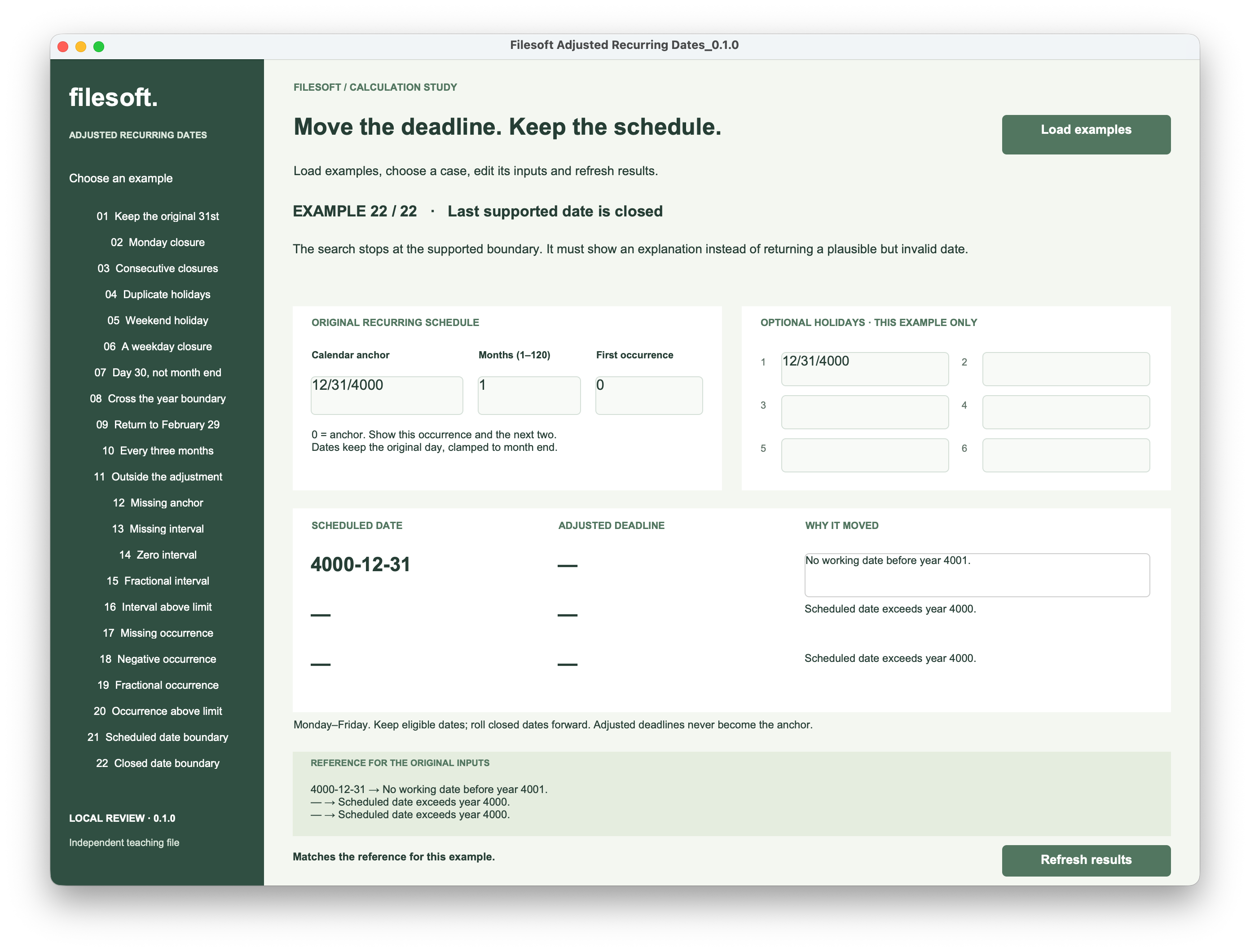
The anchor in example 22 is December 31, 4000, also entered as a holiday. The first row keeps its valid scheduled date but reports that no working date is available. The later rows report that their scheduled dates exceed year 4000.
These boundary cases should produce messages, not plausible dates outside the supported range. The 31-day search limit is a separate teaching-file guard, not a promise about any country’s holiday calendar.
6. Test the distinction in your own workflow.
Start with case 02. Change the closure, refresh twice, then switch cases and return. Check both columns: only the affected deadline should move. Try case 09 to confirm the leap-day anchor survives, and cases 21–22 to check the explanations.
The reference panel contains the original examples’ expected values. After changing inputs, use the changed-input message as a reminder that those fixed references no longer describe your custom case. Load examples preserves existing records and edits; it is not a reset button.
Before adapting the rule to a business app, decide which holiday calendar applies and whether changing a holiday should recalculate an already agreed deadline. Keep the original schedule in its own fields. This example does not create work orders, skip missed occurrences, send reminders or schedule from completion.
Evidence and scope. The five unchanged owner screenshots show cases 02, 04, 09, 21 and 22 on macOS. Structural and independent calendar-reference checks are separate from native interaction testing of every case. The file contains 22 examples; these screenshots do not establish all-version or cross-platform compatibility.
Try the adjusted recurring dates example.
The free ZIP contains Filesoft Adjusted Recurring Dates 0.1.0 and a Read Me. No name or email is required.
Free direct download · 212 KB.
- Open the file in FileMaker Pro on macOS. Use Load examples if the cases are not already present.
- Choose a case and edit its anchor, interval, first occurrence or holiday dates.
- Click Refresh results and compare the scheduled dates with their adjusted deadlines.
Keep a closed backup before experimenting. Date inputs follow your FileMaker date format; displayed results use YYYY-MM-DD.
Requires FileMaker Pro 19.6.1 or later, which is not included. While requires FileMaker Pro 18 or later; the complete file’s loader uses transaction steps introduced in 19.6.1. This example is intended for desktop macOS. Windows, Go, WebDirect and hosted use have not been tested.