A request arrives on Friday and needs a response within three working days. With a Monday-to-Friday calendar, the deadline is Wednesday. If Monday is a holiday, it moves to Thursday.
Adding three to the start date cannot answer that question. We need to inspect the dates in between and count only the ones that qualify. This article follows that approach in Filesoft Working-day Deadlines 0.1.0, an editable teaching file with 22 examples.
1. Decide which days count.
Write down the policy before writing the calculation. In this example, “working day” means Monday to Friday, excluding any dates entered in the six optional holiday fields for the selected case.
| Input or situation | Rule in this example |
|---|---|
| A positive day count | Begin on the date after the start. The start itself is not day 1. |
| Saturday or Sunday | Skip it, regardless of whether it is also listed as a holiday. |
| A weekday holiday | Skip that date once, even if entered more than once. |
| Zero days | Return the start unchanged, including a weekend or holiday. |
| An invalid count | Show a message. Accept whole numbers from 0 to 260 only. |
These are the teaching file’s rules. A different working week, a half-day, or a promise that includes the start date needs a different policy. The file does not fetch a national holiday calendar or invent a substitute Monday when a holiday falls on Sunday.
2. Cross the weekend without counting it.
Example 01 starts on Monday, January 4, 2027, with five working days and no holidays. Tuesday is day 1; Friday is day 4. Saturday and Sunday are skipped, so day 5 is Monday, January 11.
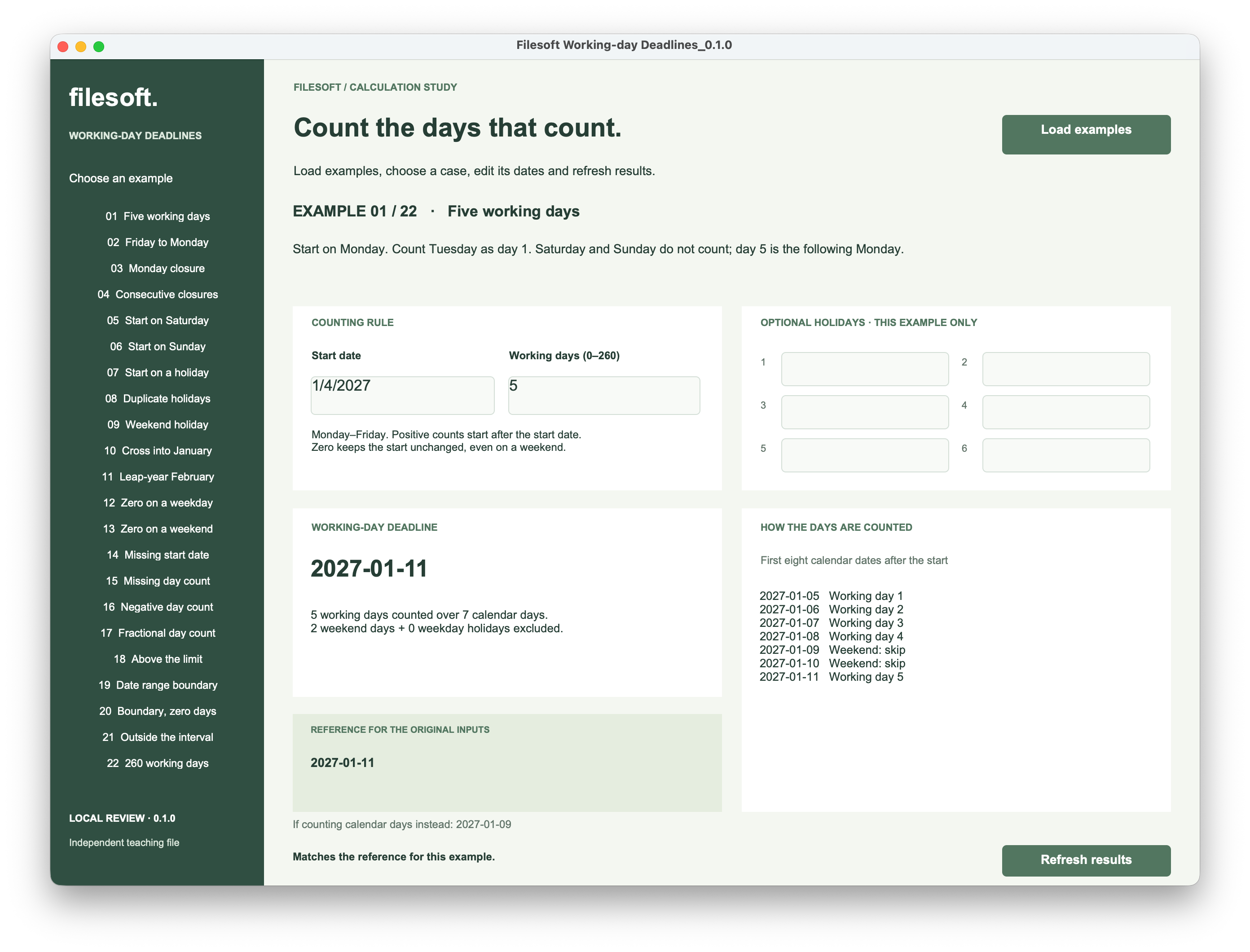
The result is seven calendar days after the start: five counted days and two weekend days. The calendar-day comparison instead gives January 9. Both calculations add five units, but they measure different things.
See two shorter examples: Friday and Sunday starts
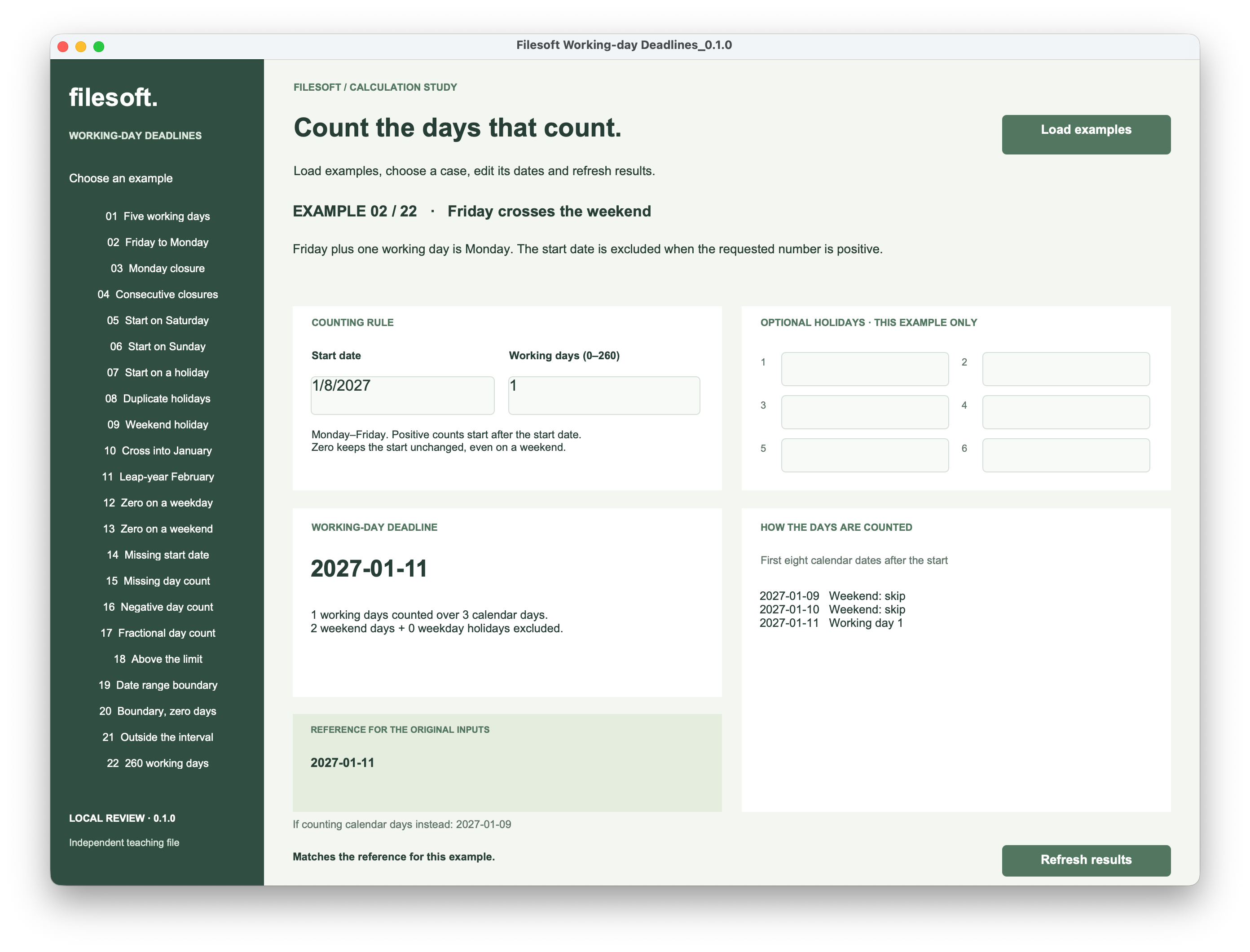
In example 02, Friday, January 8 plus one working day gives Monday, January 11. The two weekend dates are examined and skipped.
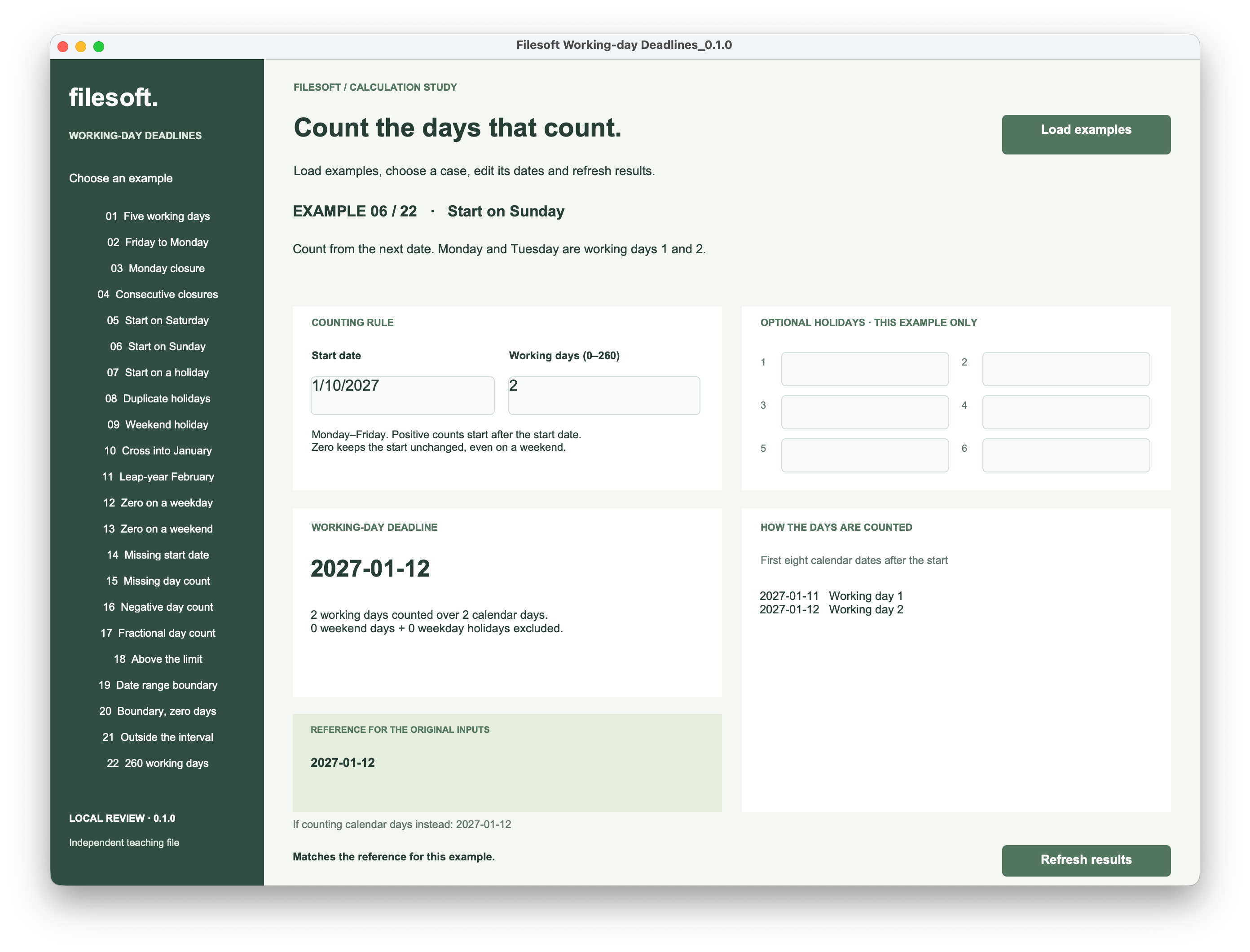
Example 06 starts on Sunday, January 10. Two working days gives Tuesday, January 12. The start is excluded, so that Sunday does not appear in the interval’s excluded-day total: Monday and Tuesday are the only dates examined.
3. Skip a holiday once.
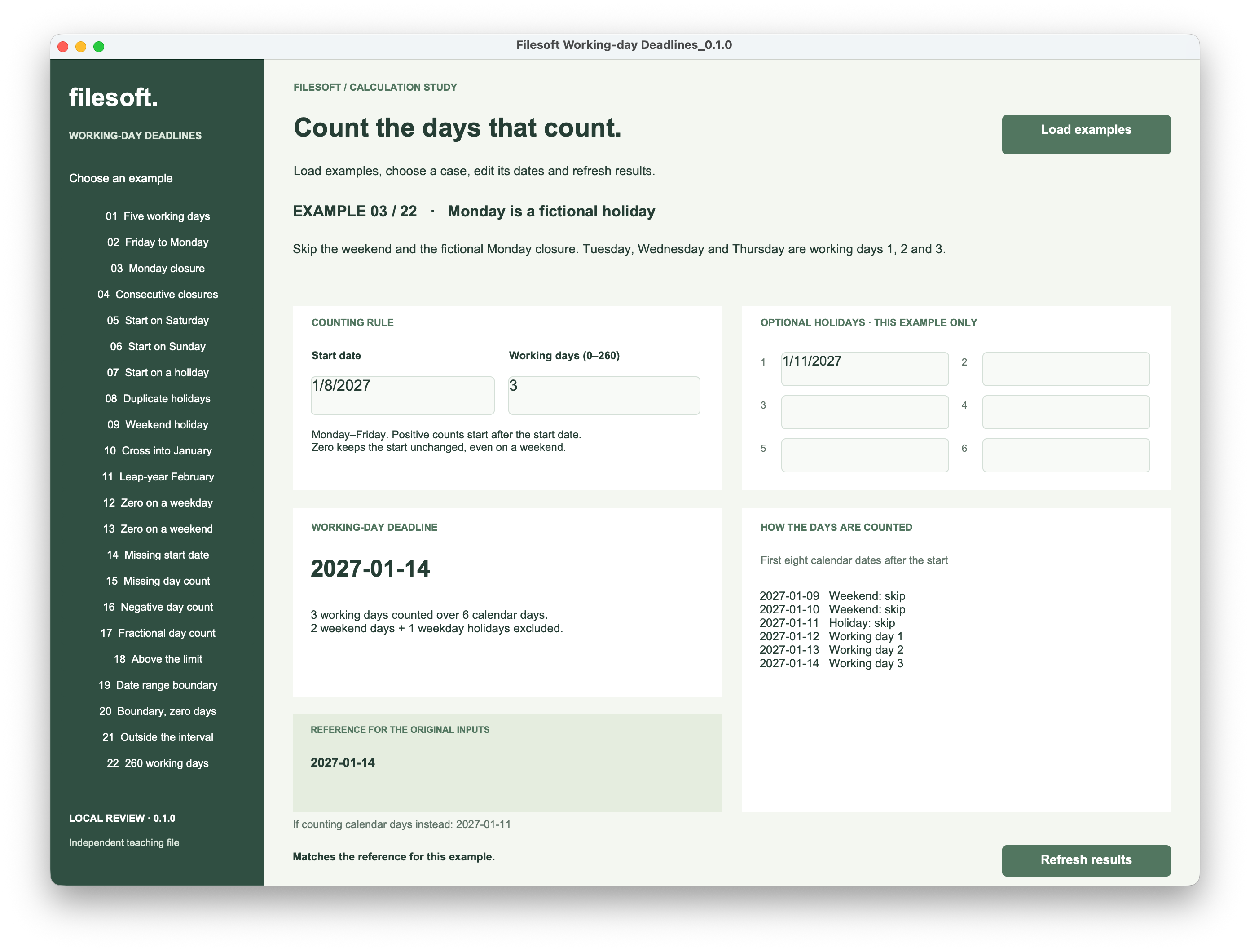
Example 03 starts on Friday, January 8 and requests three working days. We enter January 11 as a fictional Monday closure. The deadline becomes Thursday, January 14.
| Date in 2027 | Decision | Working days counted |
|---|---|---|
| January 9, Saturday | Skip weekend | 0 |
| January 10, Sunday | Skip weekend | 0 |
| January 11, Monday | Skip listed holiday | 0 |
| January 12, Tuesday | Count | 1 |
| January 13, Wednesday | Count | 2 |
| January 14, Thursday | Count and finish | 3 |
That is six calendar days: three working days, two weekend days and one weekday holiday. The holiday fields apply only to this example record.
A duplicate entry is still one closed date.
Example 08 enters January 11 in two holiday fields. The deadline stays January 14, and the excluded weekday-holiday count stays at one.
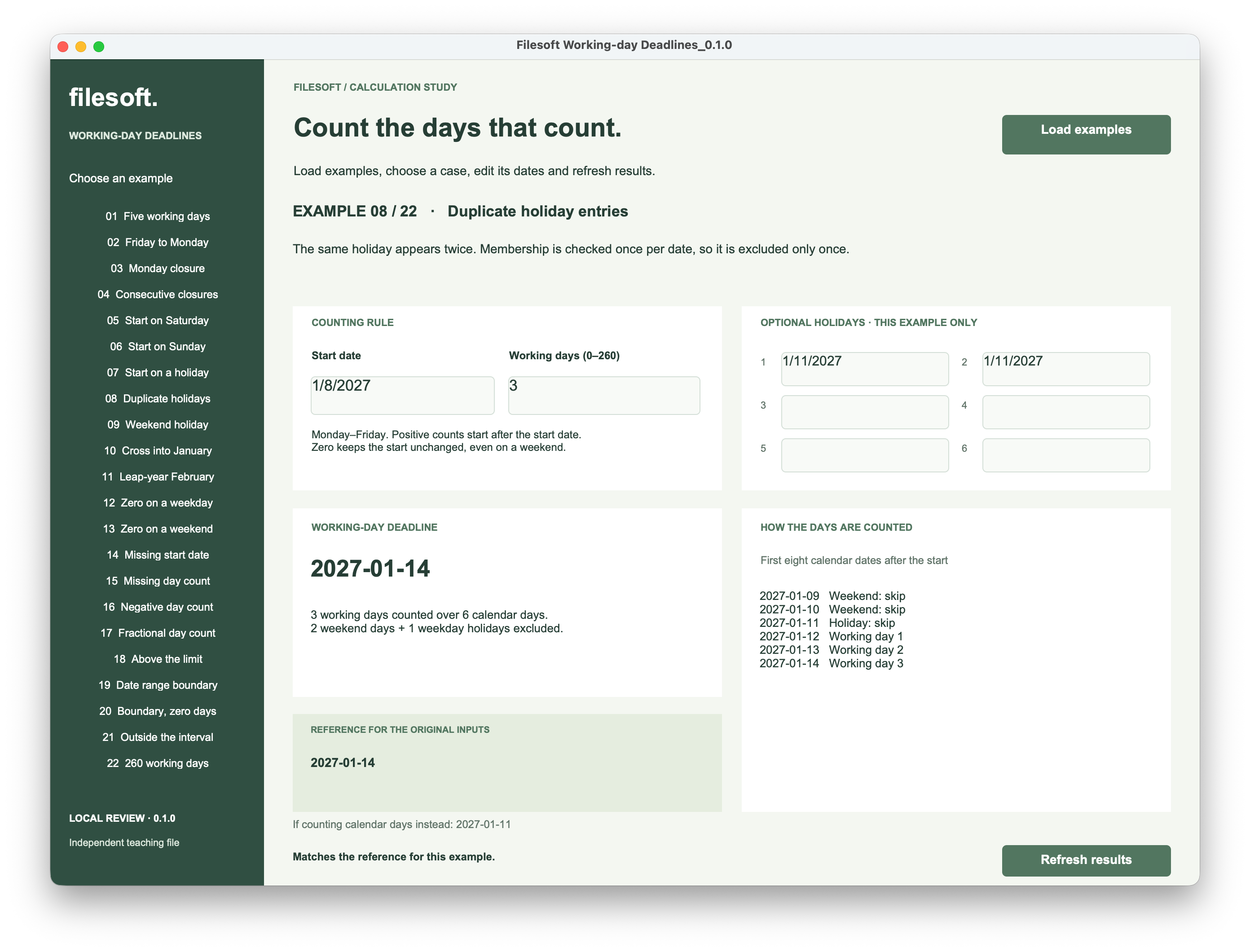
The calculation asks whether each date belongs to the holiday list. It does not subtract the number of entries in that list. A holiday outside the interval has no effect. A holiday on a weekend is already excluded and does not count twice.
4. Advance one date, then decide whether it counts.
The following expressions come from the example file. They are calculation fields, not a single expression to paste into any table. Use Date fields for StartDate and Holiday1 through Holiday6, and a Number field for WorkingDays. The helper calculations below return Text, except WorkingDeadline, which returns Date.
Keep holiday comparisons independent of display format.
HolidayNumbers converts nonblank holiday dates to numeric date values and puts them in a return-separated list. The displayed date format can remain familiar to the person entering it.
FileMaker calculation · HolidayNumbers
List ( Case ( IsEmpty ( Holiday1 ) ; "" ; GetAsNumber ( Holiday1 ) ) ; Case ( IsEmpty ( Holiday2 ) ; "" ; GetAsNumber ( Holiday2 ) ) ; Case ( IsEmpty ( Holiday3 ) ; "" ; GetAsNumber ( Holiday3 ) ) ; Case ( IsEmpty ( Holiday4 ) ; "" ; GetAsNumber ( Holiday4 ) ) ; Case ( IsEmpty ( Holiday5 ) ; "" ; GetAsNumber ( Holiday5 ) ) ; Case ( IsEmpty ( Holiday6 ) ; "" ; GetAsNumber ( Holiday6 ) ) )FilterValues checks the list for the date being examined. Wrapping its result in not IsEmpty makes that a yes/no test, so duplicate matches do not cause extra skips. See the Claris FilterValues reference.
Count qualifying dates and keep an explanation.
WorkingResultJSON starts at the supplied date with zero days counted. Each iteration advances one calendar day before checking it. FileMaker’s DayOfWeek returns 1 for Sunday and 7 for Saturday; those are the two excluded weekday numbers here. See the Claris DayOfWeek reference.
FileMaker calculation · WorkingResultJSON
Case ( not IsEmpty ( InputIssue ) ; "" ;
    While ( [
        d = GetAsNumber ( StartDate ) ; counted = 0 ; scanned = 0 ;
        weekends = 0 ; closures = 0 ; trace = "" ;
        ceiling = GetAsNumber ( Date ( 12 ; 31 ; 4000 ) )
    ] ;
        counted < WorkingDays and scanned < 730 and d < ceiling ;
    [
        d = d + 1 ; scanned = scanned + 1 ;
        isWeekend = DayOfWeek ( d ) = 1 or DayOfWeek ( d ) = 7 ;
        isHoliday = not IsEmpty ( FilterValues ( HolidayNumbers ; GetAsText ( d ) ) ) ;
        counted = counted + Case ( not isWeekend and not isHoliday ; 1 ; 0 ) ;
        weekends = weekends + Case ( isWeekend ; 1 ; 0 ) ;
        closures = closures + Case ( not isWeekend and isHoliday ; 1 ; 0 ) ;
        reason = Case ( isWeekend ; "Weekend: skip" ; isHoliday ; "Holiday: skip" ; "Working day " & counted ) ;
        trace = Case ( scanned <= 8 ; List ( trace ; Year ( d ) & "-" & Right ( "0" & Month ( d ) ; 2 ) & "-" & Right ( "0" & Day ( d ) ; 2 ) & "   " & reason ) ; trace )
    ] ;
        JSONSetElement ( "{}" ;
            [ "date" ; d ; JSONNumber ] ;
            [ "counted" ; counted ; JSONNumber ] ;
            [ "scanned" ; scanned ; JSONNumber ] ;
            [ "weekends" ; weekends ; JSONNumber ] ;
            [ "holidays" ; closures ; JSONNumber ] ;
            [ "trace" ; trace ; JSONString ] ;
            [ "issue" ; Case ( counted = WorkingDays ; "" ; d >= ceiling ; "No result before the end of year 4000." ; "Search stopped at the 730-day safety limit." ) ; JSONString ]
        )
    )
)
counted increases only for a weekday that is not a listed holiday. scanned increases for every examined date. Separate totals explain weekends and weekday holidays; trace records the first eight dates while the totals cover the whole interval.
The order of the assignments matters: advance d, classify it, then update the count and explanation. While evaluates its condition before each iteration and its logic in order. Its counters are initialized before the loop so their values carry forward. See the Claris While reference.
Return a deadline only when counting succeeded.
The JSON also carries an issue. Reaching a boundary before the requested count is complete must not turn the last examined date into a valid deadline.
FileMaker calculation · ResultIssue
Case ( not IsEmpty ( InputIssue ) ; InputIssue ; JSONGetElement ( WorkingResultJSON ; "issue" ) )FileMaker calculation · WorkingDeadline
Case ( IsEmpty ( ResultIssue ) ; GetAsDate ( JSONGetElement ( WorkingResultJSON ; "date" ) ) ; "" )ResultIssue selects an input message or the counting error. WorkingDeadline returns an empty date when there is an issue. Display the message beside the result so an empty date has a clear explanation.
See the input validation used by the example
InputIssue returns empty text for acceptable inputs. It checks the start, the whole-number day count, and any supplied holiday dates before the loop runs. The 260-day maximum is a limit of this example.
FileMaker calculation · InputIssue
Case (
    IsEmpty ( StartDate ) ; "Enter a start date." ;
    not IsValid ( StartDate ) ; "Enter a valid start date." ;
    IsEmpty ( WorkingDays ) ; "Enter the number of working days." ;
    not IsValid ( WorkingDays ) or WorkingDays < 0 or WorkingDays > 260 or Int ( WorkingDays ) <> WorkingDays or Filter ( GetAsText ( WorkingDays ) ; "0123456789" ) <> GetAsText ( WorkingDays ) ; "Use a whole number from 0 to 260." ;
    ( not IsEmpty ( Holiday1 ) and not IsValid ( Holiday1 ) ) or ( not IsEmpty ( Holiday2 ) and not IsValid ( Holiday2 ) ) or ( not IsEmpty ( Holiday3 ) and not IsValid ( Holiday3 ) ) or ( not IsEmpty ( Holiday4 ) and not IsValid ( Holiday4 ) ) or ( not IsEmpty ( Holiday5 ) and not IsValid ( Holiday5 ) ) or ( not IsEmpty ( Holiday6 ) and not IsValid ( Holiday6 ) ) ; "Correct the invalid holiday date." ;
    ""
)
The formula is shown with the file’s field names. Keep these dependencies together when recreating it, and test date entry using the formats supported by your FileMaker installation.
5. Make zero and boundary results explicit.
For zero days, the loop does not run: counted < WorkingDays is already false. The result is the unchanged start date. This deliberately differs from “move this date to the next working day.”
The loop also stops before advancing beyond December 31, 4000, and has a separate 730-calendar-day safeguard. The year limit follows FileMaker’s supported date range; see the Claris Date reference. The safeguard bounds the search even if the logic is later adapted.
Example 19 starts on December 31, 4000 and requests one working day. There is no later supported date to inspect. The file shows a dash and an explanation, rather than presenting a plausible but invalid deadline.
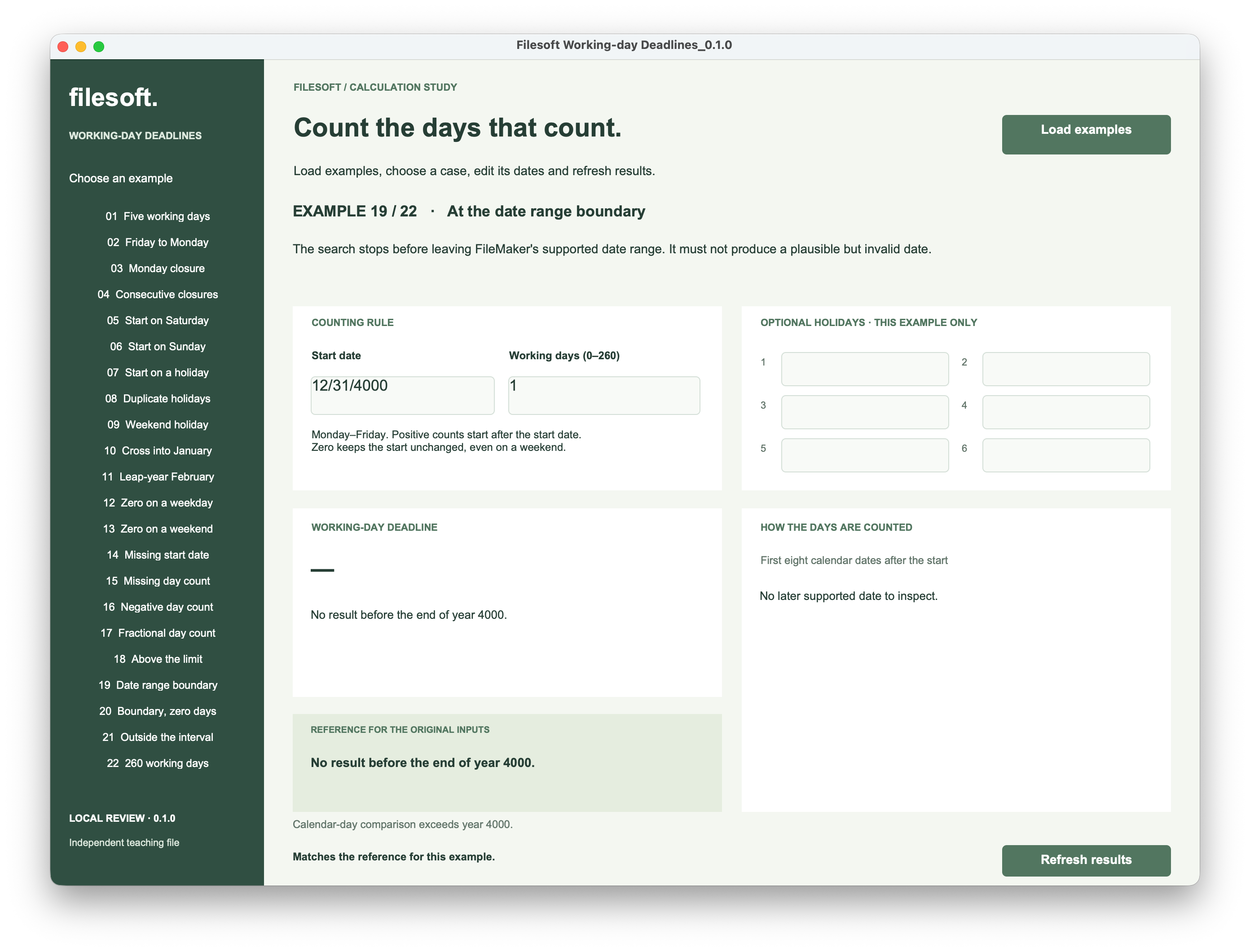
When adapting the example to a shared holiday table, keep the same distinction between “no deadline found” and a successful result. Also decide which calendar applies to each job or location and whether later holiday changes should recalculate an already agreed deadline.
6. Check the rule as well as the result.
The supplied screenshots demonstrate cases 01, 02, 03, 06, 08 and 19 on macOS. They show the weekend, holiday, duplicate and boundary results discussed here. The file includes 22 cases, including zero, missing inputs, fractional counts, leap-year dates and the maximum count.
Try changing a holiday, refreshing twice, switching cases and reopening the file. Confirm that the result follows the edited inputs and saved values remain. The reference card describes the original inputs; it should stop claiming a match when those inputs change.
Evidence and scope. The six screenshots are unchanged captures supplied during owner review. Structural checks and an independent calendar reference check cover the prepared example, but do not establish native interaction testing of all 22 cases or compatibility across FileMaker versions. This is a separate teaching file; it does not change Asset Care or create work orders.
Try the working-day example.
The ZIP contains the editable Filesoft Working-day Deadlines 0.1.0 file and a short Read Me. No name or email is required.
Free direct download · 206 KB.
- Open the file in FileMaker Pro on macOS. Use Load examples if the cases are not already present.
- Choose a case, then change its start date, day count or optional holidays.
- Click Refresh results. Compare the deadline with the counted dates and excluded-day totals.
Load examples is designed to preserve existing examples and edits; it is not a reset button. Keep a closed backup if you want to return to the original inputs.
Requires FileMaker Pro, which is not included. While was introduced in FileMaker Pro 18; this file’s loader uses transaction steps introduced in FileMaker Pro 19.6.1, so the complete file requires 19.6.1 or later. It is intended for desktop macOS. Windows, Go, WebDirect and hosted use have not been tested for this example.
Choose the right date rule for the job.
A working-day deadline answers how far to count from a starting date. A recurring schedule answers which occurrence comes next. Keep those decisions separate before combining them in an app.