209 reusable styles
Coordinated styles for fields, buttons, button bars, panels, and layout parts.
Inkstone, cobalt, and damson meet pistachio and cloud. Five colors for your next FileMaker app.
Suggested for Technology · Analytics · Education
Tested with FileMaker Pro 18–26, FileMaker Go, and FileMaker WebDirect.
A CLOSER LOOK
From the first field to the final button,
a consistent starting point for your interface.
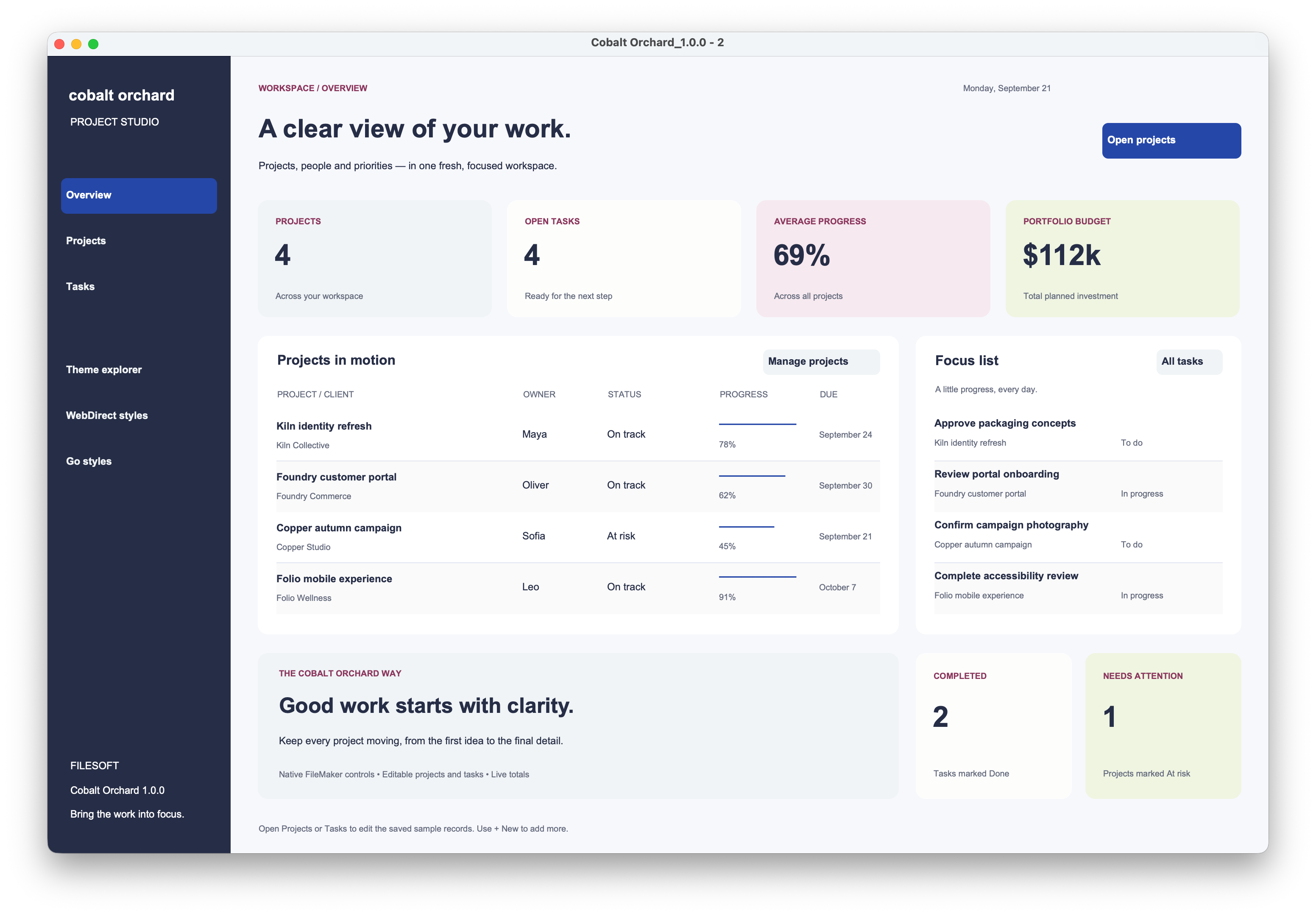
Previews show the unchanged 1.0.0 design. Version 1.0.1 updates packaging; the layouts and approved screenshots are unchanged.
INCLUDED WITH YOUR THEME
A practical starting point for your next FileMaker app.
Explore, import, and make it yours.
Coordinated styles for fields, buttons, button bars, panels, and layout parts.
Explore Dashboard, Projects, Tasks, a desktop control sampler, a WebDirect form, and a Go layout.
A consistent palette for your app, with room to customize colors to suit your own brand.
Explore sample records and layouts, then adapt the design for your own application.
Import the theme from the included demo and apply it to existing or new FileMaker layouts.
Follow the customer Read Me and our short installation video to import and apply your theme.
Tested with FileMaker Pro 18–26, FileMaker Go, and FileMaker WebDirect. The version range refers to FileMaker Pro.
After PayPal confirms payment, your download link is emailed to your PayPal address. The link is valid for 30 days.
A theme carrier, installable theme resources, a customer Read Me, and six preview images and an SVG palette.
Demo layouts and sample records are starting points for development, not finished business applications.
This one-minute guide uses Spring Garden. Follow the same import-and-apply steps for any Filesoft theme.
THE COBALT ORCHARD PALETTE
Cobalt focus. Pistachio light.
Five signature colors, one coordinated palette.
#262D46#2547A8#8B365D#D6EAA5#F0F4F6YOUR NEXT APP STARTS HERE
Cobalt Orchard for FileMaker. By Filesoft.
Pay securely with PayPal. Your download link arrives by email.
A FEW THINGS TO KNOW
Choose any three different full themes for US$99—US$33 each, saving US$48 against three individual US$49 purchases. Select your themes on the collection page, then pay once through PayPal. One email provides private access to all three ZIPs for 30 days.
Tested with FileMaker Pro 18–26, FileMaker Go, and FileMaker WebDirect. The 18–26 version range refers to FileMaker Pro.
After PayPal confirms your payment, we email a private download link to your PayPal email address. The link is valid for 30 days. Save your ZIP after downloading, and follow the included Read Me to get started.
Email support@filesofttools.com with your theme name and, if you have purchased, your order reference. We can help with download access or a replacement link.
These suggestions reflect the palette’s visual character. Use this theme for any type of FileMaker app; industry-specific features are not included.
Cobalt Orchard is a FileMaker theme by Filesoft, with 209 named styles and six demo layouts. Styles supply appearance; field bindings, records, button actions, and icon assignments belong to your solution.
The package includes Cobalt Orchard_1.0.1.fmp12, installable theme resources, a customer Read Me, and six preview images and an SVG palette.
Dashboard, Projects, Tasks, All Objects, WebDirect, and Go. The dashboard and record editors demonstrate a sample project workspace, not a production project-management app. WebDirect uses a dedicated browser form; Go uses a scrolling iPhone portrait layout.
The themes have been tested with FileMaker Pro 18–26, FileMaker Go, and FileMaker WebDirect. Dashboard and record-editor images are native screenshots; framed desktop, browser, and phone images illustrate presentation. Importing a theme transfers its styles, not layouts, records, or button actions. Use the included demo and installation guide to get started.
The launch price is US$49 per theme, followed by a regular price of US$79. Choose Buy theme to pay securely with PayPal and receive your download link by email.