You issue a quote for $100 and save its PDF. Later, the customer agrees to a revision worth $104. When they ask for the first document, opening it should still show $100.
Saving the quote’s values is one part of that promise. Saving the actual PDF is another. A report generated again may use a changed layout, wording or calculation, even when its source values are unchanged. Give the saved document its own identity and keep its content.
This walkthrough uses Filesoft PDF Snapshot History 0.1.0, a small, independent teaching file. It extends the idea in keeping quoted prices separate from catalogue prices. The screenshots follow the owner’s native test: save a $100 original, issue a $104 revision, then open the $100 original again.
1. Save the $100 original.
Extract the ZIP into a writable folder and open it in FileMaker Pro 26 on your Mac. In Quote workspace, choose Load example → Load. Create a new quote and issue it. The starting quote contains two desk lamps at $40 each and one desk mat at $20: $100 total.
With Q-001 / r1 selected, click PDF history → Save original PDF. The history now contains one PDF linked to that issued quote revision. The panel identifies its PDF version, generation time, document ID and filename.
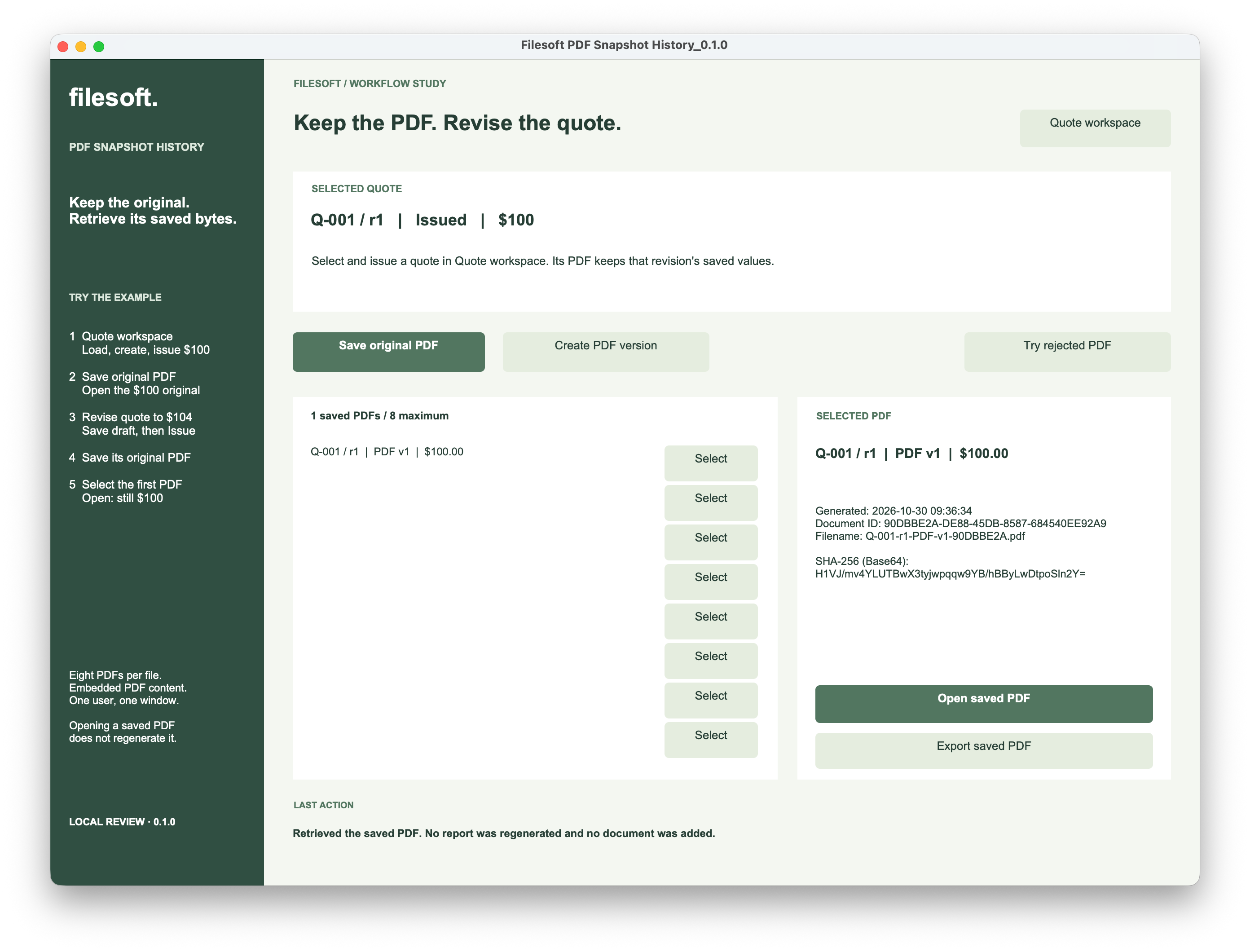
Click Open saved PDF. The PDF shows Q-001 / r1, PDF version 1 and the $100 total. Its document ID matches the history entry. Inspect the actual page, including the line amounts, margins and footer.
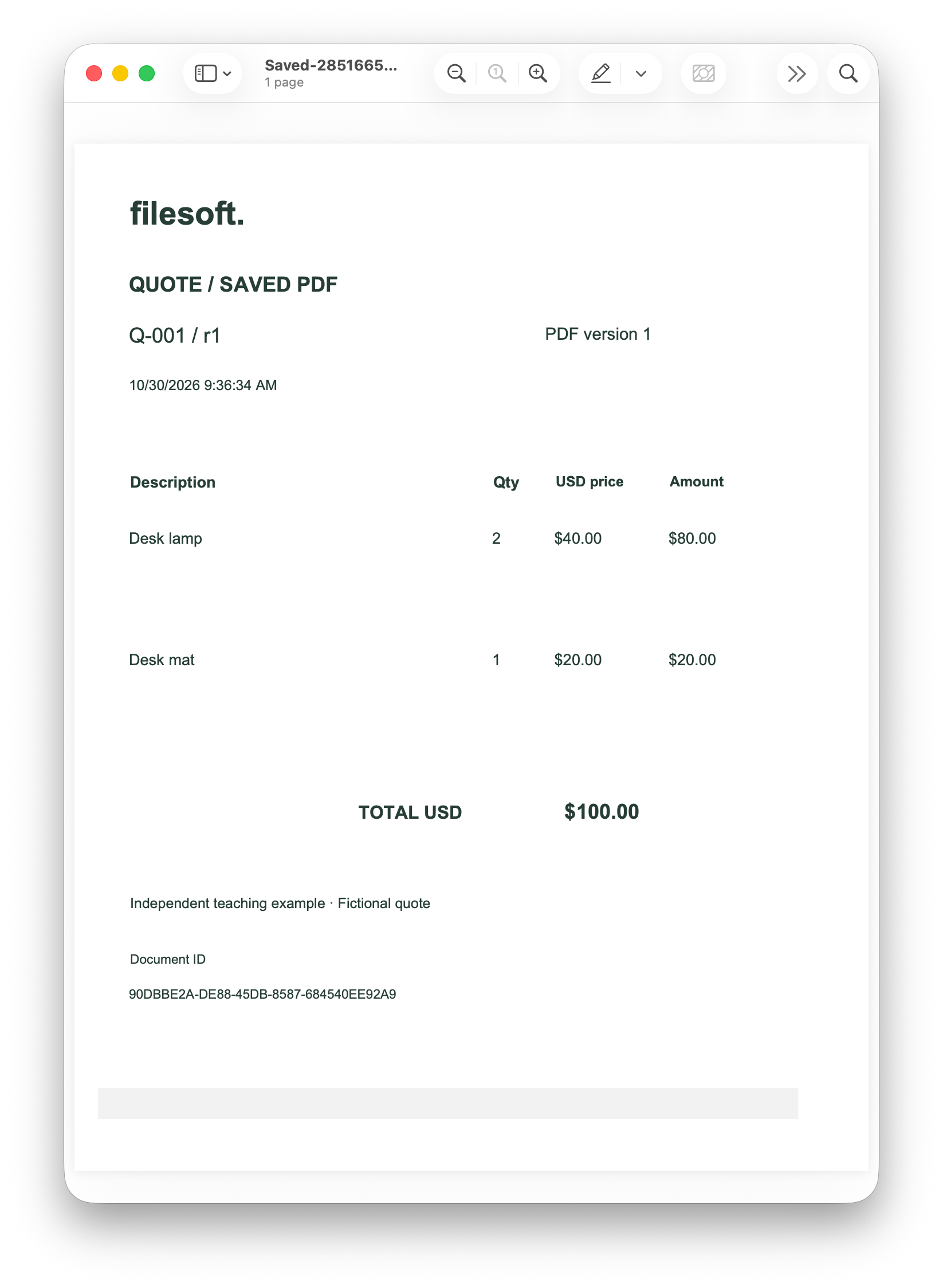
The original belongs to this specific quote revision. Saving the same original again should select the existing document instead of regenerating it or adding another history row.
2. Save the $104 revision separately.
Return to Quote workspace, select Q-001 / r1 and choose Create revision → Continue. The new draft starts from the original quote’s saved values. Change the lamp’s quote-line price to 42, click Save draft, then Issue quote.
Changing the catalogue alone does not change the draft’s copied price. Make the deliberate price change on the revision’s line. Two lamps at $42 plus the $20 mat give $104.
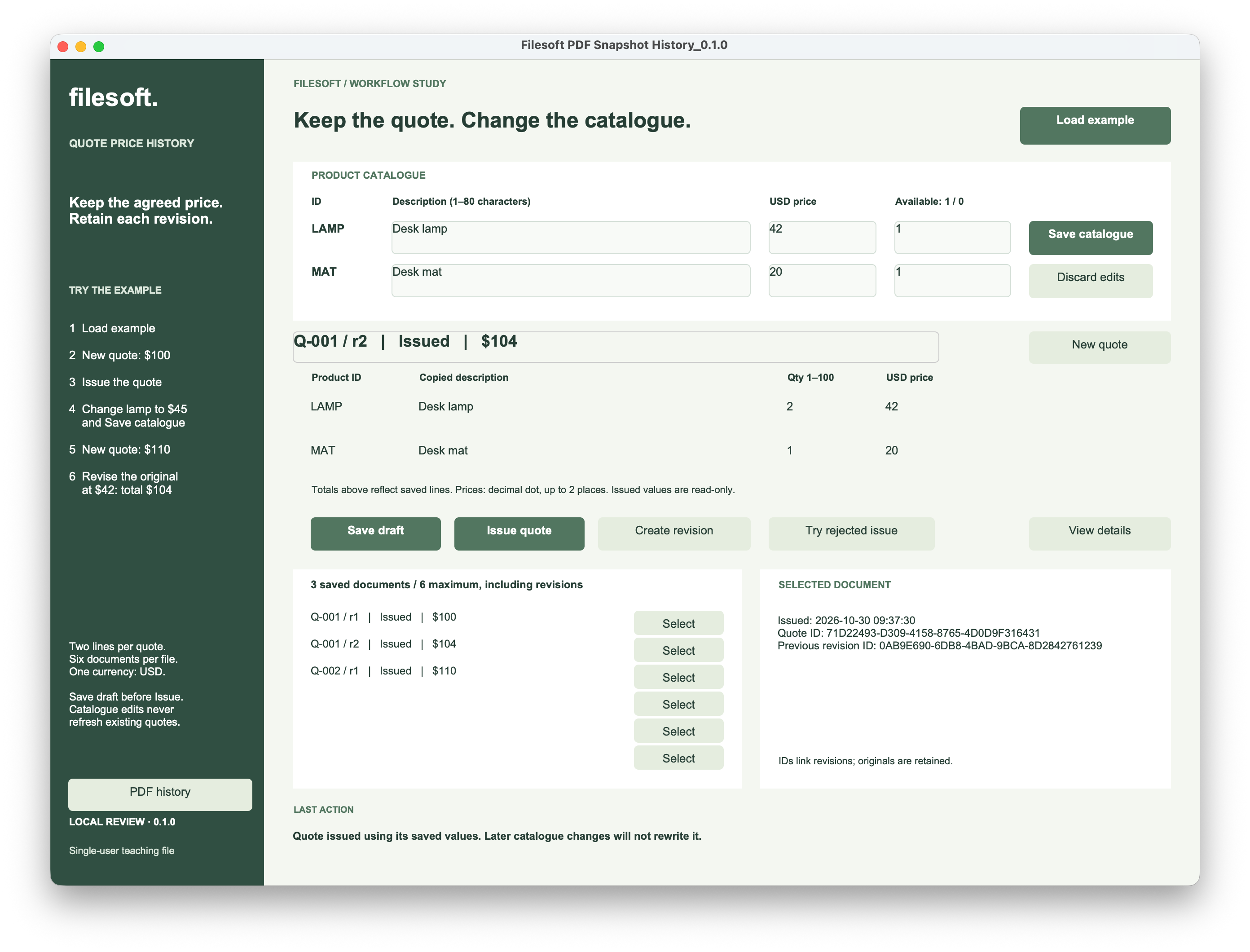
The screenshot also contains Q-002 at $110 from a separate catalogue-price exercise. It is a different quote, not a revision of Q-001. You do not need to create it for the PDF walkthrough.
With the issued Q-001 / r2 selected, open PDF history and click Save original PDF. This saves the revised quote’s own original PDF. The history retains both entries: r1 at $100 and r2 at $104.
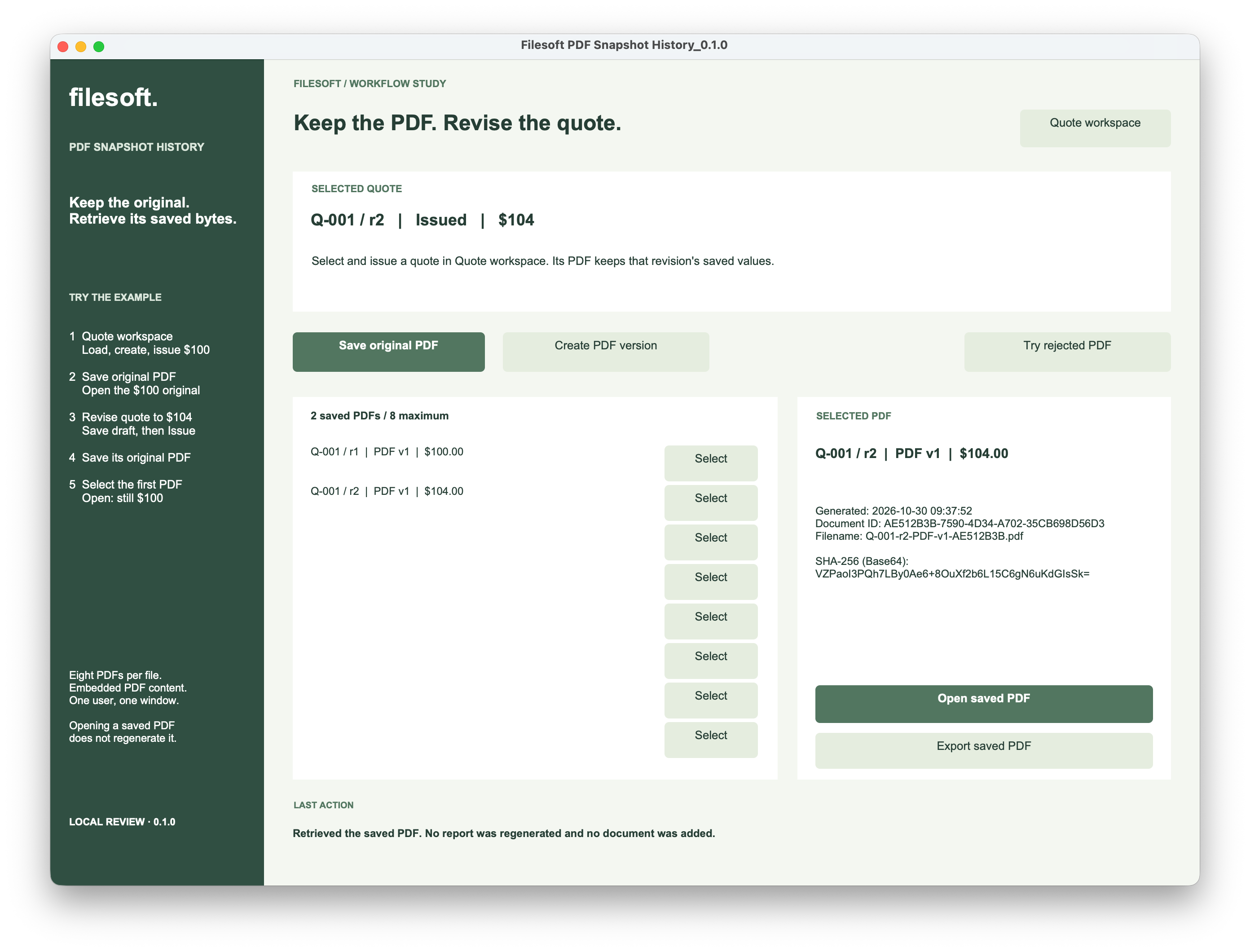
Open the second PDF. It shows Q-001 / r2, two lamps at $42, and the $104 total. Its document ID and generation time differ from the first PDF.
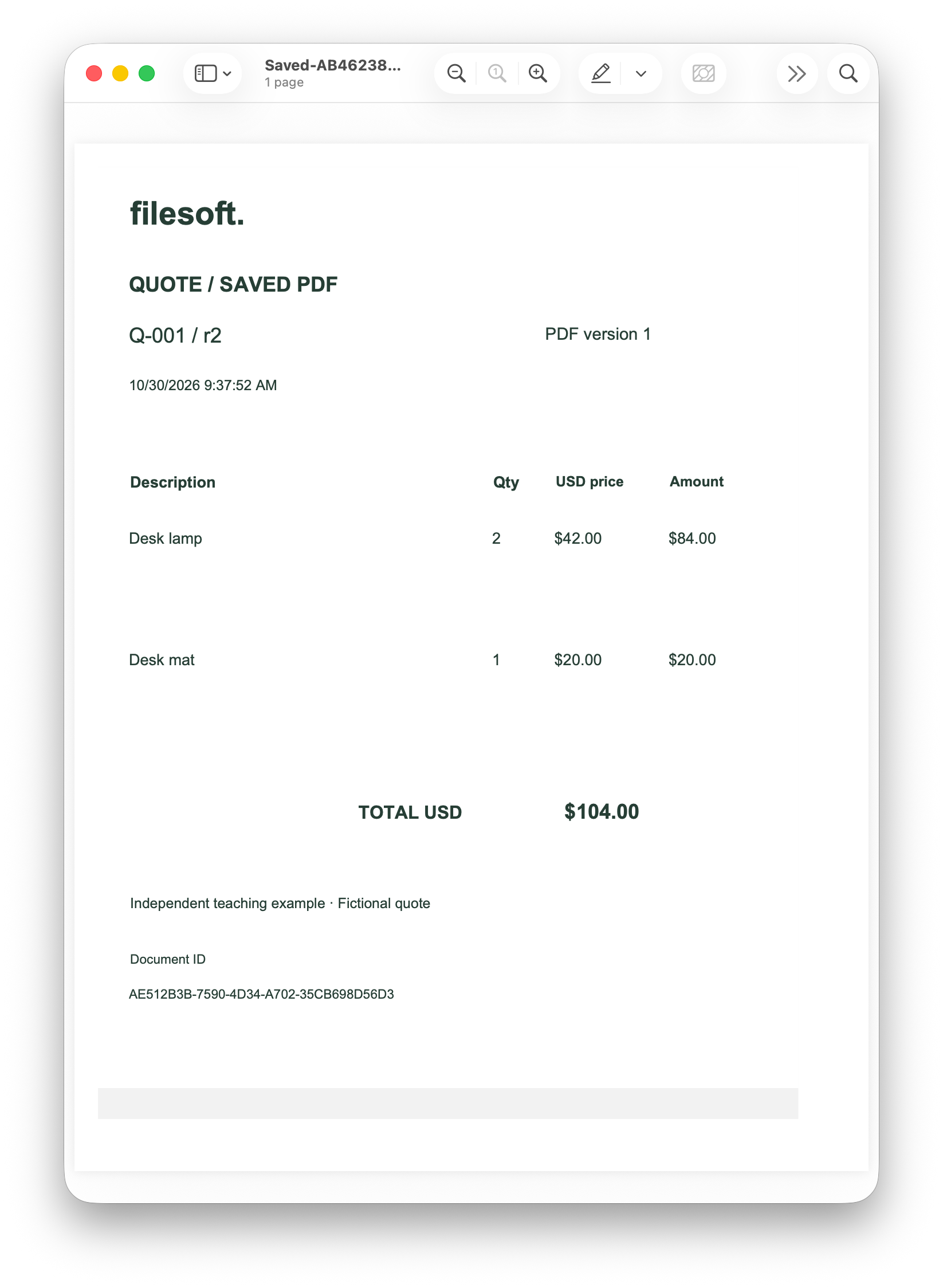
Quote revision and PDF version are separate numbers. Both PDFs above are PDF version 1 because each is the first PDF for its particular quote revision. The additional Create PDF version action produces another document for the same issued revision; it does not revise the quote’s prices.
3. Open the original again.
In the PDF list, select Q-001 / r1 / PDF v1 / $100.00 and click Open saved PDF. The selected quote at the top can still be r2 at $104. The selected PDF determines which document opens.
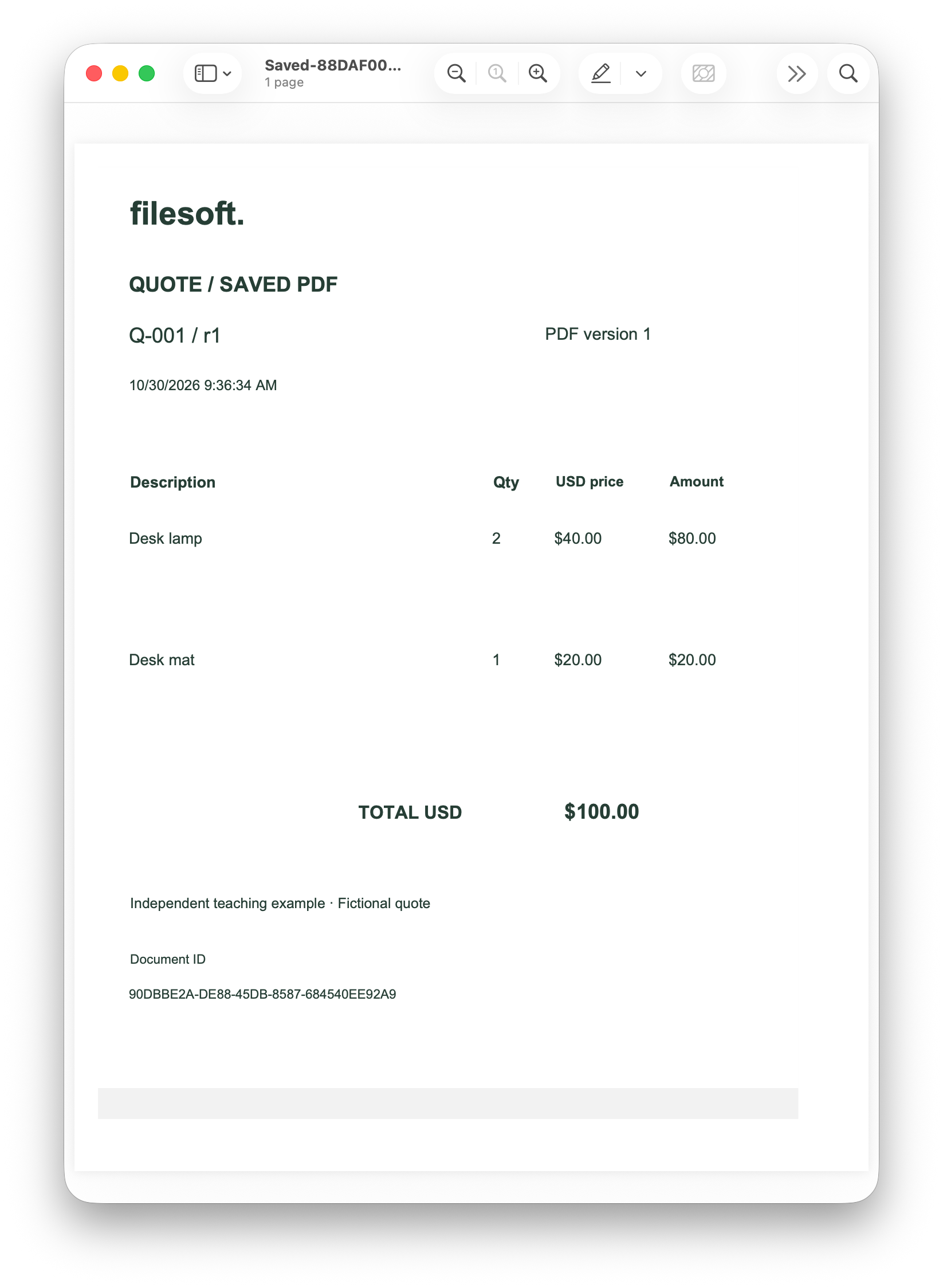
The reopened original still shows $100, the earlier generation time and its original document ID. Opening a saved PDF retrieves the content stored with that document; it does not run the report-generation script again.
Now close and reopen the FileMaker file normally. Choose Load example, return to PDF history and open each saved PDF. Loading again preserves history. The owner confirmed this reopening exercise, repeated original saves keeping the count at two, and a rejected save preserving both existing PDFs.
Visible sameness and identical bytes are different checks. The screenshots demonstrate the retained values and identities. To establish byte-for-byte equality, export the same original before and after later activity, then compare the two files’ SHA-256 hashes. That independent exported-file comparison has not been completed for this walkthrough.
The example stores a digest alongside the content and checks it when retrieving a document. That check is useful for detecting a mismatch, but it does not authenticate the author or protect against a Full Access user changing both the PDF and its digest.
4. Give each PDF its own identity.
The example keeps quote revisions in Quotes, their saved line values in Lines, and generated documents in Documents. Each quote revision has its own quote ID. A document links to that exact ID, rather than looking up whichever revision happens to be newest.
- DocumentID
- A unique identity for this saved PDF.
- QuoteID and SourceLabel
- The exact source revision and its readable label, such as Q-001 / r1.
- PDFVersion and VersionKey
- The PDF version within that quote revision and a required unique key.
- CreatedAt, Filename and Total
- Metadata identifying what was generated and when.
- Payload and Digest
- The stored PDF content and its saved SHA-256 digest.
For this small portable file, PDF content is embedded in a container field. A path to a temporary file would not be a durable original. Claris describes embedded, referenced and externally stored content in its container-field documentation. Production storage needs its own backup and access design; Claris recommends external container storage as a general best practice.
Keep generation and retrieval separate.
On generation, the script reads the selected issued quote and its two saved lines, captures their values, and renders a dedicated print layout in a helper window. This implementation uses Save Records as PDF to make a temporary file, then inserts its content and stores the document metadata and content together in a transaction.
On retrieval, the script finds the selected document by ID, checks that its content exists and its digest matches, and uses Export Field Contents to retrieve it. The Open action uses a temporary output copy; Export lets you choose a destination. Neither action needs current catalogue prices or a newly rendered report.
Keep all failure paths explicit. A missing container, failed export or failed generation should produce a useful error. Do not silently substitute a freshly generated report when the requested original cannot be retrieved.
5. Handle repeats, cancellation and failure.
- Save original PDF: reuse the existing version 1 for the selected quote revision. Repeated clicks must not change its identity, generation time or history count.
- Create PDF version: ask for confirmation and add a separate document. Cancel creates nothing; each confirmed request is an intentional new version.
- Open or export: preserve the stored document if the destination or viewer is unavailable. Cancelling an export must not remove its history.
- Try rejected PDF: the teaching control deliberately attempts to store an empty required document key. The expected result is a failed save with earlier documents retained.
The owner confirmed the rejected-save preservation check. It is a controlled validation exercise, not evidence of recovery from a crash or every possible storage error. A database rollback also does not delete a temporary PDF already written to disk; temporary files can remain until FileMaker or the operating system clears them.
When adapting the pattern, test repeated actions, cancellation, unavailable destinations, incomplete data and normal close/reopen behavior. A hosted application also needs coordinated version allocation, locking and simultaneous-client tests. This local, single-user example does not establish those guarantees.
Try PDF Snapshot History.
The free ZIP contains Filesoft PDF Snapshot History 0.1.0 and a Read Me with the walkthrough and additional tests. It starts empty; Load example creates the fictional catalogue. No name or email is required.
Use FileMaker Pro 26 on macOS, locally, with one user and one window. FileMaker Pro is sold separately. If prompted, sign in as Admin with an empty password. This editable teaching file is separate from Filesoft’s customer solutions.
Test evidence, limits and further practice
The owner supplied the illustrated $100 and $104 PDF walkthrough and confirmed reopening, repeat-original saving and rejected-save preservation. The exact native patch version was not recorded. The downloadable database bytes match the original empty example used to begin that walkthrough; the ZIP’s Read Me has been updated to reflect these results.
Independent exported-PDF byte comparison remains unverified. Additional versions, cancellation, destination failures and maximum-length values are exercises in the Read Me, not claimed as completed owner tests.
The file allows eight PDFs, six quote records including revisions, two lines per quote and USD only. It has no reset. To start again, fully close the file and extract a fresh copy. Back up the closed file to retain its embedded PDFs.
The unlocked file is for learning. Interface restrictions are not a security boundary against Full Access. It is not a signed or tamper-proof archive. Windows, Go, WebDirect, hosting, concurrent users, tax, payments and email delivery are outside the verified scope.